

How to register an online account and use a promo code?

1. Log in or register an online account
Log in to your Hilti account. Don't have an account? No worries, it only takes a few minutes to set up.

2. Add eligible products to your shopping cart
Browse the product catalog, select eligible products, and then proceed to checkout.
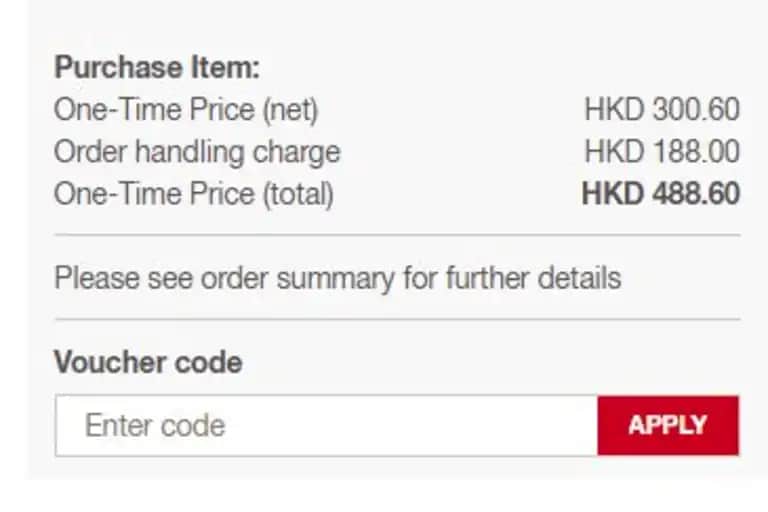
3. Enter the discount code
Under the checkout details, you will see a field labeled 'Discount Code'. Enter the discount code here and click the 'Apply' button.

4. Order Complete
Complete the order by clicking the 'Submit Order' button at the bottom right of the page. Want to check order history, free maintenance expiration dates, or download invoices and arrange repairs? The official website features meet all your needs.
Terms and Conditions for E-Voucher
Terms and Conditions
Promo codes must be used during the promotional period. Expired promo codes will not be accepted.
Promo codes are only applicable to orders placed through the Hilti website and cannot be used through other sales channels.
Only one promo code can be used per order and cannot be combined with other discounts or promotional offers.
Distributors are not eligible to participate in this promotion. Hilti reserves the right to cancel any orders or promotional benefits resulting from violations of these terms.
Orders placed during the promotion period cannot be modified, cancelled, or returned. Please confirm your purchase requirements before placing an order.
Hilti (Hong Kong) reserves the right to amend, interpret, or cancel this promotion. Any updates will be announced on the official website without prior notice.
eVoucher FAQ
Yes. You must log in to your Hilti online account to place an order and use a promo code.
After adding eligible products to your shopping cart, proceed to checkout. On the next page, under “Order Summary”, you will find a field where you can enter your promo code. After entering the code, click the “Apply” button. If there are any issues, the relevant error message will be displayed.
After the promo code has been successfully applied, a green confirmation message stating “eVoucher applied” will appear. You can check the discount amount in the product price section. Once the details are confirmed, click “Submit Order” to complete your purchase.
Each promo code has its own redemption limit. Please refer to the terms and conditions of the promotion for details.
No. Only one promo code can be used per order, and it cannot be combined with other discounts or promotional offers.
No. Promo codes are only applicable to orders placed through the Hilti online store.
No. Promo codes cannot be applied to orders that have already been submitted.